

You must place your tenants’ deposit in any tenancy deposit protection scheme if you rent out your home on an assured shorthold tenancy (AST) that have started after 6 April 2007.
These Deposit schemes ensure the tenants will get their deposit back if they:
-
meet the terms of the tenancy agreement
-
do not damage the property
-
pay the rent and bills
You must put your tenants’ deposit in the scheme within 30 days of getting it.
If you’re in any kind of dispute with your tenants the deposit is protected in the scheme until any issues are settled.
Note: This integration only covers the custodial scheme.
⚙️ Accessing the Deposit Scheme in System Configuration
To access the deposit scheme settings, follow these steps within Acquaint:
-
Click File (top-left corner of the Acquaint interface)
-
Select Configuration
-
Go to Site/Branch
-
Choose your Branch
-
Expand the +Lettings section
-
Select Deposit Scheme
🆔 Inputting your DPS IDs
To access the DPS IDs, follow these steps within Acquaint:
-
Click File (top-left corner of the Acquaint interface)
-
Select Configuration
-
Go to Site/Branch
-
Choose your Branch
-
Expand the +Bespoke/3rd Party Links section
-
Select:
-
DPS Agent ID
-
DPS Client ID
-
DPS Client Secret
-
Need a hand? This short video guides you through these settings with ease.
You must make sure the Scheme you are using is set to the Deposit Protection Service UK.
If the DPS has been set as the Deposit Scheme:
-
When adding a new Tenancy, a new DPS Registration screen should appear allowing submission. This will;
-
Display information about the tenancy for checking purposes; tenant and property with a means to edit these details.
-
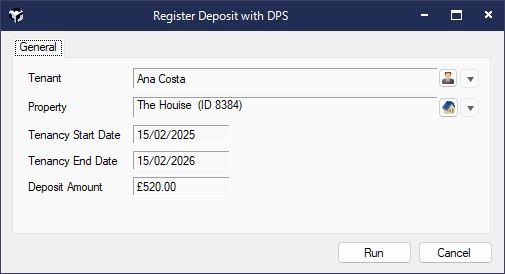
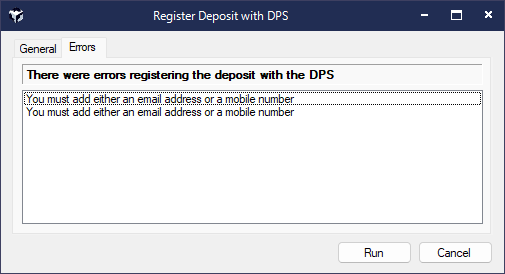
Any errors returned by the DPS will be put within the Errors Tab of the DPS Registration Message.
A confirmation message if successful - “Your Tenancy has been registered with the DPS and the Deposit Scheme ID has been saved.”
-
In turn this will update of the Deposit Scheme ID field held against the Tenancy.
From the Tenancy List screen right click menu, an option to submit a Tenancy via DPS Registration
-
If the Tenancy already has a Deposit Scheme ID then this wont be allowed.
DPS are quite strict on the data validation, for instance a property must have a postcode, a tenant must have either an email or a mobile.