📲 SMS Gateway Integration with Acquaint
Acquaint’s SMS Gateway integration enables your contacts to reply directly to your text messages. These replies are automatically imported into Acquaint and stored under the contact’s Correspondence tab, allowing you to maintain a complete and seamless conversation history.
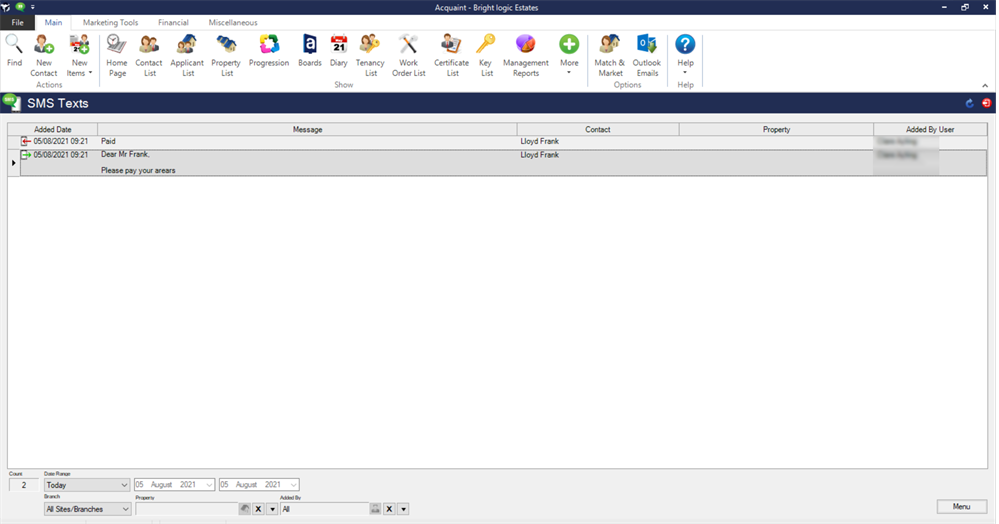
📋 SMS Texts List Screen
The SMS Texts List screen provides a centralised view of all SMS activity:
-
Sent messages
-
Received replies
-
Unread messages requiring attention
This screen makes it easy to manage incoming texts and respond efficiently.
🔧 Activating SMS Reply Service
To use the SMS Reply feature, you’ll need to subscribe to a virtual mobile number.
Please contact support@brightlogic.co.uk to request activation.
💬 Managing SMS Replies
From the SMS Texts List screen, you can take action using the Menu button or by right-clicking on a message. Available options include:
-
New – Compose a new SMS reply
-
Edit – Modify an existing message
-
Set as Unread – Mark a message for follow-up
-
Set All as Read – Clear unread status
-
Send as Message to User – Forward SMS content internally
-
Find – Search messages
-
Export Grid to Excel – Export message data
-
Refresh – Update the message list
🔔 Notifications & Responding
Acquaint will alert you to unread SMS messages via:
-
A Home Page reminder
-
A Desktop Alert
Clicking either will take you directly to the SMS Texts List screen, where unread messages are highlighted in bold.
To reply:
-
Right-click on the SMS message
-
Select New
-
The Send SMS Text screen will open
-
Compose your message and click Send