✨ AI-Powered Content Creation in Acquaint
Acquaint offers integrated Artificial Intelligence (AI) tools to help you generate written content effortlessly. Whether you're crafting property descriptions or composing marketing emails, AI can provide creative inspiration and save you time.
💳 How to Access AI Features
AI functionality is available as a pay-as-you-go service. To get started:
-
Go to the Help menu and select Purchase Artificial Intelligence (AI) Credits
-
Or, click the AI Credits reminder on the Home Page under the System tab
Once credits are purchased, you can use them whenever you need. For example, you can write your own property description manually, or use a credit to generate a full version with AI assistance.
🖥️ Where You Can Use AI
AI text generation is available on the following screens:
|
Screen |
Section |
|
Property |
Details #2 – Full Description |
|
Property |
Rooms / Rooms Template – Full Description |
|
Email / Email Template |
Body |
|
SMS / SMS Template |
Body |
|
Home Page |
Miscellaneous Tab |
⚙️ How to Use the AI Generator
-
Click the AI icon on any of the supported screens

-
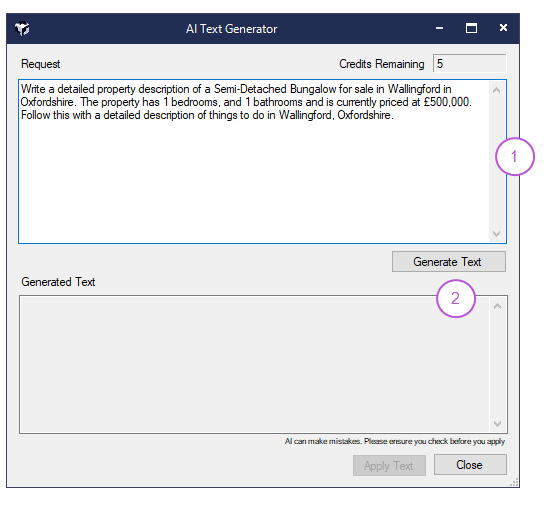
A pre-filled prompt will appear to help you get started
-
Edit the prompt in the Request field if needed
-
Click Generate Text to send your request to the AI
-
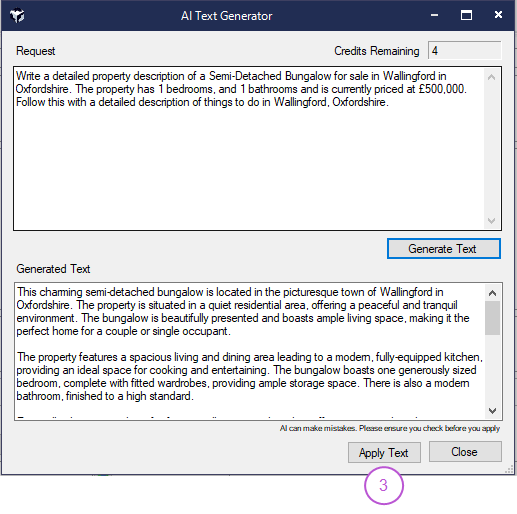
Review the result in the Generated Text box
-
Click Apply Text to insert it directly into your content field
Need a fresh version? You can click Generate Text again to produce a new output. Keep in mind that unless you change the prompt, the result may be similar. Each generation counts as one credit.
The example below shows AI generated text for a Property description.